Hi~welcome to shenzhen xinmu display technology co., ltd.!

News Center

hotline:

13632760729

The LED screen interface cannot be found? Three-step positioning method can be seen

2025-09-16 110

Do newbies who are new to LED screens often catch things? Looking at the dense sockets behind me, I couldn't tell which one was the power supply and which one was the signal port. Last week, a friend who opened a gym complained to me that the rental he bought was unable to connect to the computer, but found that he had plugged the network cable into the debugging port. Today, let’s break it up and talk about this matter. You will definitely become an "interface expert" after reading it!

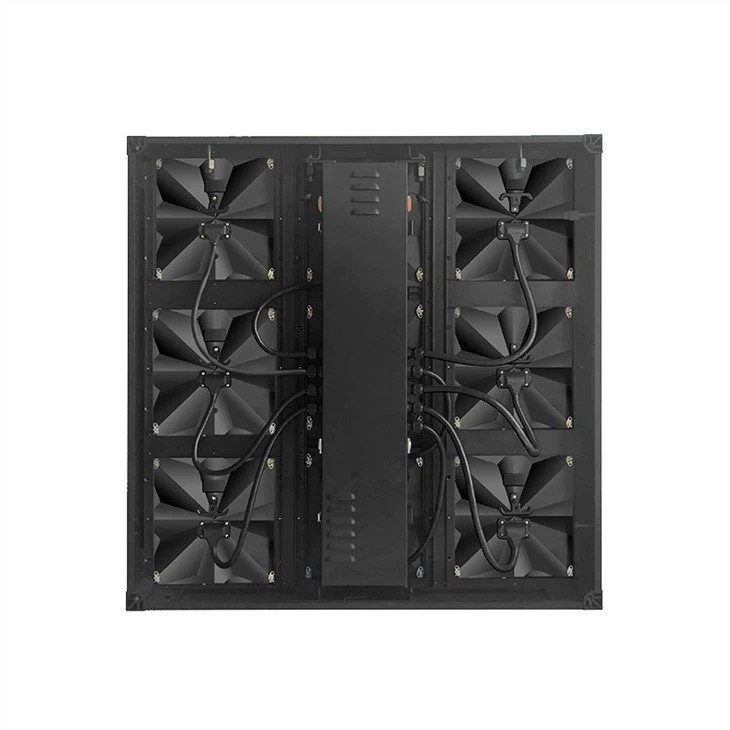
▍Where is the interface hidden? Identify these three areas
Nowadays, LED screen design is becoming more and more user-friendly.​ ​There are three common interface locations​​:

The LED screen interface cannot be found? Three-step positioning method can be seen
  1. Bottom groove (waterproof model will have dust-proof cover)
  2. Side slot of the receiving card (most conspicuous with color markings)
  3. Next to the power box (usually marked with lightning symbols)

Last year, when I was helping the mall install a curved screen, I encountered a typical example: the installer connected the signal cable to the power supply port, and half of the screen was burned out immediately after powering on. So,​ ​The price of mis-touching is greater than expected​ ​. Nowadays, many high-end models will make interfaces with different functions into anti-moment designs, such as the power port being one circle larger than the signal port, so it is difficult to plug in the wrong way.

▍The interface types are very different. This comparison table is good
Don't look at the interface, the functions are very different:

Interface appearanceCommon featuresThings to note
Blue square with buckleMain signal inputYou have to hear the "click" sound to be considered as being stuck
Black round threadedPower inputTighten clockwise to prevent falling off
Green flat mouthBackup signalPower off first when hot plugging

I have a tip to share with you:​ ​Models with IP65 protection​ ​, there will be a rubber seal at the interface. The last time I installed a fence screen for the beach restaurant was this design that withstand the heavy rainstorm during the typhoon. Here is a reminder that if you see rust on the interface, you must ask the manufacturer to replace it with a new module - this is a solid evidence that you have been in water!

▍Connect practical skills and learn the unscrupulous party
It is correct to operate in this order:

  1. Connect the power cord (black round port) first but don't turn on the power
  2. Insert the main signal line (blue square port) and pay attention to the direction
  3. Finally connect the backup cable (green flat port)

Someone helped the dance classroom install floor tiles, and the workers connected the signal line in the reverse direction, causing the picture to be mirrored. Later I found that the new models now have intelligent error correction functions.​ ​Screen with refresh rate above 1920Hz​ ​Basically, it can automatically identify the signal direction. However, for the sake of safety, it is recommended to check the status of the interface indicator before starting the machine.

Editor's opinion: Choosing a model with a quick disassembly and assembly interface can really save you! Especially for rental screens that require frequent mobile, I have seen 32 screens replaced on site in 10 minutes. It is recommended that novices focus on three points: interface anti-fire design, waterproof level, and whether there are alternate interface positions. For example, those exported to Japan and South Korea, the interfaces must be tested for salt spray and will not be rusted for three to five years. Remember, there are only eight words for a good interface - it can be inserted so that it can't be pulled out!

for more product information and pricing, please contact us .

Shenzhen New Screen Display Technology Co.Ltd