Hi~welcome to shenzhen xinmu display technology co., ltd.!

News Center

hotline:

13632760729

Where is the LED display motherboard hidden?

2025-06-27 204

Every time I see the cool advertising screens in the mall, people always ask: Where is the heart of this thing? Especially when the screen suddenly fell off, the maintenance master knocked around with a screwdriver, which made people confused. Today, let’s take a look at this most troublesome problem for novices - where is the LED display motherboard hidden?

LED显示屏主板到底藏在哪?

​1. What does the motherboard look like? ​
Don’t think that the motherboard is like the ones in the computer with green boards and slots. The motherboard with LED screens is a master of drag. Have you ever seen the circuit board of the courier scan the code gun in his hand? It's about the same size, but the thickness can be as high as three Oreos stacked. There are two common outfits: one is iron box packaging (professionally called shielded boxes), which are specially designed to deal with outdoor wind and rain. ; The other is that the bare board is directly fixed to the aluminum frame, which is more common in indoor screens. The dense interfaces on this thing are like a mechanical octopus, with round holes connecting to power, cable slots connecting to control cards, and HDMI ports that specialize in video signals.

​2. Where is the safest thing to hide the heart? ​
Let's look at three common scenarios:

  1. ​Outdoor advertising large screen​
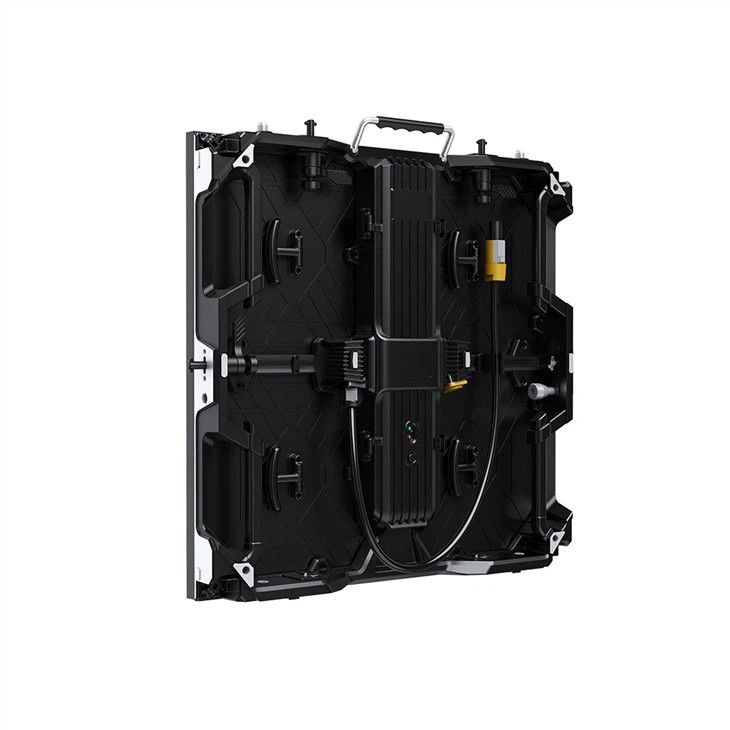
    The back of this giant looks like a hive, and there is a motherboard hidden in every "hive" (professional called box). If you look carefully at the side of the box, are there any heat dissipation holes? The motherboard hides on the metal bracket behind the hole, just one palm away from the power module. Why do you have to let it go like this? Outdoor screens must be lightning-proof! The motherboard and the power supply are close to each other, which can reduce line interference, just like the fact that our mobile phone charger is close to the socket.

  2. ​Transparent window screen​
    This cool screen that can see the scenery behind it is particularly interesting. It is not on the back of the screen—or it will destroy the transparency, but is stuck in the upper and lower borders of the screen like a belt. Next time you go shopping, pay attention to the shopping mall windows. The black decorative strips on the top of the screen are probably the hiding place of the motherboard. This design also allows the repairman to inspect and repair without dismantling the entire screen.

  3. ​Quickly disassemble and install rental screen​
    The LED walls that can be assembled into various shapes at the event are secretly in the iron door with handles on the back of the box. Pull the handle open and you will see the motherboard inserted into the slide rail like a drawer. This quick disassembly design allows the staff to change the motherboard in 20 seconds - faster than changing the projector light bulb.

​3. Five-step tips for finding the motherboard by yourself​

  1. Touch the temperature first: After turning on the phone, touch the screen frame with the back of your hand. Ninety percent of the areas that are obviously hot are hidden.
  2. Look at the direction of the cable: follow the thickest bundle of power cords, and the motherboard must be at the next stop at the power output.
  3. Find heat dissipation holes: circular or strip holes arranged regularly, the main board must be underneath.
  4. Listen to the sound: The motherboard with a cooling fan will make a slight buzzing sound, like the old hard drive reading sound
  5. Check the interface: When you see dense colored cable gathering, it is the main board camp

​4. Three major pitfalls that novices should not step on​
A customer disassembled the screen two days ago, but the 5,000 yuan reception card was burned because of these mistakes:

  • Live operation (screwdriver hits the motherboard capacitor and sparks directly)
  • Hard-draw the cable (revealing the pins in the interface)
  • Use an ordinary rag to wipe the motherboard (static electricity penetrates the chip)
    The correct way is: prepare anti-static gloves, disconnect the main power supply first, and blow dust with a special air pump. If you see a model code like "HV110" printed on the motherboard, don't scratch it, it's an anti-counterfeiting coating.

Speaking of this, I remembered a real thing: Once I replaced the main board of the fenced screen for the gymnasium, and the worker installed the main board on the sun. As a result, the temperature soared to 70 degrees under direct sunlight, and the screen turned into a snowflake point. Later, it was changed to install a heat sink on the shadow side before the solution was solved. Therefore, the location of the motherboard should not only be hidden, but also pay attention to the cooling environment.

​5. Hidden skills of the old bird in the industry​

  1. Dual motherboard backup: High-end screen will install a motherboard in each upper and lower frames, and automatically switch it immediately if one is hung
  2. Waterproof tips: 704 silicone should be applied at the joints of the outdoor screen motherboard, and do not use ordinary glass glue (cracks after three months)
  3. Lightning protection tips: connect the varistor in parallel at the entrance of the motherboard power supply, and can carry 0.5 seconds of life-saving time when lightning strikes
    These are the guys who are having a meal with the maintenance master, and today they made an exception.

Next time I see the LED screen black screen, don’t slap the shell. Remember this secret: follow the power supply to find the motherboard and find out the location and do things easily. What if it still can't be done? It is recommended to contact the manufacturer directly - some precision parts are really not something that novices can touch casually, after all, the money for a motherboard is enough to buy a second-hand car.

for more product information and pricing, please contact us .

Shenzhen New Screen Display Technology Co.Ltd